管理画面の固定ページ一覧、投稿一覧に「スラッグ」を追加表示する方法
 login_user
WordPressの管理画面で固定ページ一覧と投稿一覧を表示すると、タイトル・作成者・日付などは確認できますが、デフォルトでは「スラッグ(URLの一部)」が表示されません。
サイト運営でページ管理を効率化するために、スラッグを固定ページ一覧、投稿一覧に表示させる方法をご紹介します。
1 functions.phpにコードを追加
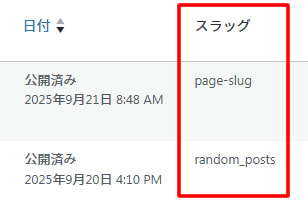
管理画面の「固定ページ一覧」に「スラッグ」列が表示されます。
// ------------------------------
// 固定ページ一覧、投稿一覧に「スラッグ」を追加
// ------------------------------

// 固定ページ一覧にスラッグ列を追加
add_filter('manage_pages_columns', function($columns) {
    $columns['slug'] = 'スラッグ';
    return $columns;
});
add_action('manage_pages_custom_column', function($column, $post_id) {
    if ($column === 'slug') {
        $post = get_post($post_id);
        $slug = $post->post_name;
        echo '' . esc_html($slug) . '';
    }
}, 10, 2);

// 投稿一覧にスラッグ列を追加
add_filter('manage_posts_columns', function($columns) {
    $columns['slug'] = 'スラッグ';
    return $columns;
});
add_action('manage_posts_custom_column', function($column, $post_id) {
    if ($column === 'slug') {
        $post = get_post($post_id);
        $slug = $post->post_name;
        echo '' . esc_html($slug) . '';
    }
}, 10, 2);

// 管理画面用CSSを読み込む
add_action('admin_enqueue_scripts', function($hook) {
    // 投稿一覧(edit.php)、固定ページ一覧(edit-pages.php)のみ
    if (in_array($hook, ['edit.php', 'edit-pages.php'])) {
        wp_enqueue_style(
            'admin-columns-style',
             //お使いのcssファイル名に変更
            get_stylesheet_directory_uri() . '/style.css'
        );
    }
});

// CSSを読み込む
add_action('admin_enqueue_scripts', function($hook) {
    if ($hook === 'edit.php' || $hook === 'edit-pages.php') {
        //お使いのcssファイル名に変更
        wp_enqueue_style('my-admin-style', get_stylesheet_directory_uri() . '/style.css');
    }
});
補足:
manage_pages_columnsフィルターで「スラッグ」列を追加。manage_pages_custom_columnアクションで実際のスラッグを表示。$post->post_nameがスラッグに相当します。get_stylesheet_directory_uri() . '/style.css'の「style」部分にご自身のお使いのcssファイル名に変更。
2 汎用CSS
管理画面のスタイルに以下を追加すると見やすくなります。
/* -----------------------------
 * 固定ページ一覧、投稿一覧に「スラッグ」を追加するためのスタイル
 * ----------------------------- */

/* 投稿・固定ページ一覧の各カラム幅を調整 */
.column-title      { width: 20% !important; } /* タイトル列の幅 */
.column-author     { width: 10% !important; } /* 投稿者列の幅 */
.column-categories { width: 12% !important; } /* カテゴリー列の幅 */
.column-tags       { width: 12% !important; } /* タグ列の幅 */
.column-date       { width: 10% !important; } /* 日付列の幅 */
.column-slug       {
    width: 12% !important;           /* スラッグ列の幅 */
    max-width: 120px;                 /* 最大幅を120pxに制限 */
    white-space: nowrap;              /* 折り返さず1行表示 */
    overflow: hidden;                 /* はみ出した部分を非表示 */
    text-overflow: ellipsis;          /* はみ出した部分は…で表示 */
}
.column-thumbnail img {
    width: 80px;                      /* アイキャッチ画像の幅 */
    height: auto;                      /* 高さは自動でアスペクト比維持 */
}

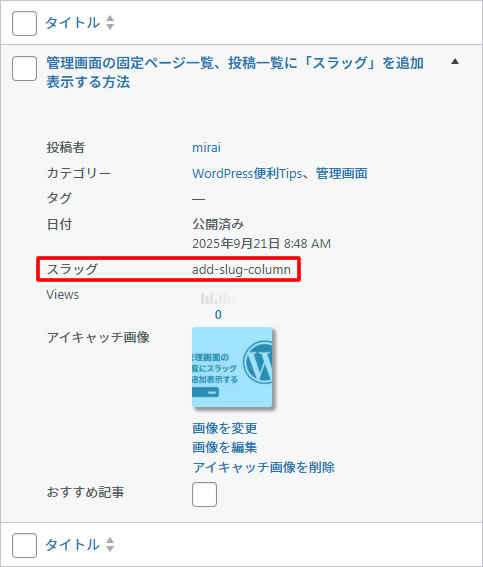
/* スマホ向けレスポンシブ(画面幅782px以下) */
@media screen and (max-width: 782px) {
  .column-title,
  .column-author,
  .column-categories,
  .column-tags,
  .column-date,
  .column-slug {
    width: auto !important;          /* 幅を自動調整 */
    max-width: none !important;      /* 最大幅制限を解除 */
    white-space: normal !important;  /* 折り返し可能に */
    overflow: visible !important;    /* はみ出しも表示 */
    text-overflow: clip !important;  /* 省略記号はなし */
  }

  /* サムネイル画像は小さめに表示 */
  .column-thumbnail img {
    width: 50px;
    height: auto;
  }
}
補足1:
- 管理画面専用CSSは 存在する列だけに効く ので、固定ページと投稿一覧で列が違っても大丈夫。
- 万一、将来的に新しい列を追加した場合は、必要に応じて .column-○○ の幅を追加すればOK。
3 完成イメージ
3.1 PC
3.2 スマホ対応(幅 782px 縦並び)
4 まとめ
このコードを追加することで、WordPress管理画面の固定ページと投稿一覧に「スラッグ」が表示されます。大規模サイトや固定ページが多い場合、ページ管理の効率化にとても役立ちます。