サイドバーに最近の投稿(サムネ付き)を表示する方法
 login_user
目次
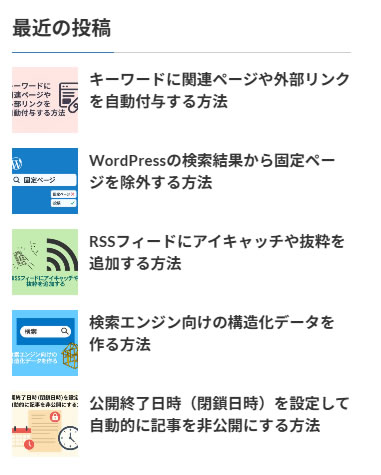
WordPress のサイドバーに「最近の投稿」を表示する際、サムネイル(アイキャッチ画像)付きで一覧化すると見栄えが良くなり、ユーザーの回遊率アップにもつながります。この記事では、functions.php にコードを追加してウィジェットを作成し、CSS で整える方法を紹介します。
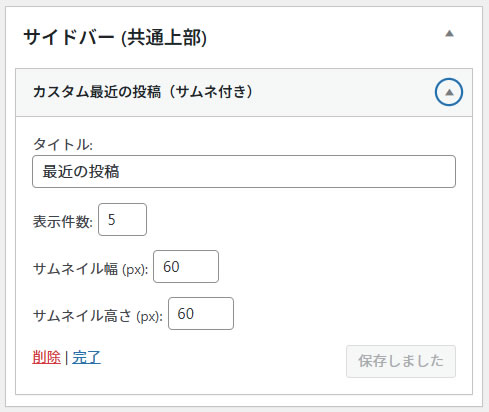
この記事では、サムネイル付きの最近の投稿ウィジェットを、CocoonとLightning両方のテーマで安心して使える形で実装する方法を解説します。管理画面から件数やサムネイルの幅・高さを設定可能です。
1 実装のポイント
- 投稿タイプにサムネイル機能が有効化されていることを前提にしています。
- ウィジェットの設定で件数・サムネイル幅・高さを変更可能。
- Cocoon・Lightning 両方で動作確認済み。
- CSSは汎用+テーマ別で分けて調整可能。
- サムネ幅が151px以上の場合、タイトルは画像の上に表示されます。
2 functions.php にコードを追加
//-------------------------------------------
//サイドバーに最近の投稿(サムネ付き)を表示する
//-------------------------------------------

// サムネイル機能を投稿タイプに追加
add_theme_support('post-thumbnails', array('post'));

// カスタム最近の投稿(サムネ付き)ウィジェット
class My_Recent_Posts_Widget extends WP_Widget {

    function __construct() {
        parent::__construct(
            'my_recent_posts_widget',
            'カスタム最近の投稿(サムネ付き)',
            array('description' => 'サムネイル付きで最近の投稿を表示するウィジェット(Cocoon・Lightning対応)')
        );
    }

    function widget($args, $instance) {
        echo $args['before_widget'];

        if (!empty($instance['title'])) {
            echo $args['before_title'] . apply_filters('widget_title', $instance['title']) . $args['after_title'];
        }

        $recent_posts = wp_get_recent_posts(array(
            'numberposts' => !empty($instance['number']) ? intval($instance['number']) : 5,
            'post_status' => 'publish'
        ));

        $thumb_width = !empty($instance['thumb_width']) ? intval($instance['thumb_width']) : 60;
        $thumb_height = !empty($instance['thumb_height']) ? intval($instance['thumb_height']) : 60;
        $thumb_style = 'width:' . esc_attr($thumb_width) . 'px; height:' . esc_attr($thumb_height) . 'px; object-fit:cover;';

        echo '<div class="recent-posts-widget">';
        foreach ($recent_posts as $post) {
            $post_id = $post['ID'];
            $title = esc_html($post['post_title']);
            $permalink = get_permalink($post_id);

            $thumb_class = 'recent-post-thumb-img';
            if ($thumb_width >= 151) {  // ← 151px以上でタイトルを下に回す
                $thumb_class .= ' large';
            }

            $thumbnail = '';
            if (has_post_thumbnail($post_id)) {
                $thumbnail = get_the_post_thumbnail($post_id, 'full', array('class' => $thumb_class));
                $thumbnail = str_replace('<img ', '<img style="' . $thumb_style . '" ', $thumbnail);
            }

            echo '<div class="recent-post-item' . ($thumb_width >= 151 ? ' large' : '') . '">';

            if ($thumbnail) {
                echo '<a href="' . esc_url($permalink) . '" class="recent-post-thumb">' . $thumbnail . '</a>';
            }
            echo '<a href="' . esc_url($permalink) . '" class="recent-post-title">' . $title . '</a>';
            echo '</div>';
        }
        echo '</div>';

        echo $args['after_widget'];
    }

    function form($instance) {
        $title = !empty($instance['title']) ? $instance['title'] : '最近の投稿';
        $number = !empty($instance['number']) ? $instance['number'] : 5;
        $thumb_width = !empty($instance['thumb_width']) ? intval($instance['thumb_width']) : 60;
        $thumb_height = !empty($instance['thumb_height']) ? intval($instance['thumb_height']) : 60;
        ?>
        <p>
            <label for="<?php echo $this->get_field_id('title'); ?>">タイトル:</label>
            <input class="widefat" id="<?php echo $this->get_field_id('title'); ?>"
                   name="<?php echo $this->get_field_name('title'); ?>" type="text"
                   value="<?php echo esc_attr($title); ?>">
        </p>
        <p>
            <label for="<?php echo $this->get_field_id('number'); ?>">表示件数:</label>
            <input class="tiny-text" id="<?php echo $this->get_field_id('number'); ?>"
                   name="<?php echo $this->get_field_name('number'); ?>" type="number" step="1" min="1"
                   value="<?php echo esc_attr($number); ?>" size="3">
        </p>
        <p>
            <label for="<?php echo $this->get_field_id('thumb_width'); ?>">サムネイル幅 (px):</label>
            <input class="tiny-text" id="<?php echo $this->get_field_id('thumb_width'); ?>"
                   name="<?php echo $this->get_field_name('thumb_width'); ?>" type="number" step="1" min="10"
                   value="<?php echo esc_attr($thumb_width); ?>" style="width: 60px;">
        </p>
        <p>
            <label for="<?php echo $this->get_field_id('thumb_height'); ?>">サムネイル高さ (px):</label>
            <input class="tiny-text" id="<?php echo $this->get_field_id('thumb_height'); ?>"
                   name="<?php echo $this->get_field_name('thumb_height'); ?>" type="number" step="1" min="10"
                   value="<?php echo esc_attr($thumb_height); ?>" style="width: 60px;">
        </p>
        <?php
    }

    function update($new_instance, $old_instance) {
        $instance = array();
        $instance['title'] = (!empty($new_instance['title'])) ? strip_tags($new_instance['title']) : '';
        $instance['number'] = (!empty($new_instance['number'])) ? intval($new_instance['number']) : 5;
        $instance['thumb_width'] = (!empty($new_instance['thumb_width'])) ? intval($new_instance['thumb_width']) : 60;
        $instance['thumb_height'] = (!empty($new_instance['thumb_height'])) ? intval($new_instance['thumb_height']) : 60;
        return $instance;
    }
}

// ウィジェット登録
function register_my_recent_posts_widget() {
    register_widget('My_Recent_Posts_Widget');
}
add_action('widgets_init', 'register_my_recent_posts_widget');
補足:
サムネイルが表示されるには、テーマ側で投稿タイプのサムネイル対応が有効化されている必要があります。
サムネイルが表示されるには、テーマ側で投稿タイプのサムネイル対応が有効化されている必要があります。
3 汎用CSS
/* ------------------------------------------
 * サイドバーに最近の投稿(サムネ付き)を表示する
 * ------------------------------------------ */

/* ウィジェット全体 */
.recent-posts-widget {
    display: flex;                  /* フレックスボックスで配置 */
    flex-direction: column;         /* 投稿ごとに縦積み */
    gap: 10px;                      /* 投稿間の間隔 */
}

/* 各投稿アイテム */
.recent-post-item {
    display: flex;                  /* 画像とタイトルを横並び */
    align-items: flex-start;        /* タイトルを画像の上部と揃える */
    /* align-items: center;         タイトルを画像の中央に揃える場合はこちら */
    gap: 10px;                      /* 画像とタイトル間の間隔 */
    flex-wrap: wrap;                /* 幅が狭い場合は改行 */
}

/* サムネイル画像 */
.recent-post-thumb-img {
    border-radius: 4px;             /* 角を丸くする */
}

/* 大きい画像の場合(幅100%) */
.recent-post-thumb-img.large {
    flex-basis: 100%;               /* 幅を100%に */
    display: block;                 /* ブロック表示に */
}

/* 投稿アイテム全体が大きい場合は縦並びに */
.recent-post-item.large {
    flex-direction: column;         /* 画像の下にタイトル */
    align-items: flex-start;        /* 左揃え */
}

/* 画像が150px以上ならタイトルを画像下に配置 */
.recent-post-thumb-img.large + .recent-post-title {
    flex-basis: 100%;               /* タイトルを上に */
    margin-top: 5px;                /* 画像との間隔 */
}

/* タイトルリンク */
.recent-post-title {
    font-size: 14px;                /* フォントサイズ */
    color: #333;                    /* 文字色 */
    text-decoration: none;          /* 下線なし */
    flex: 1;                        /* 横幅をできるだけ使う */
}

/* ホバー時のタイトルリンク */
.recent-post-title:hover {
    text-decoration: underline;     /* 下線を表示 */
}
4 テーマ別サンプルCSS
4.1 Lightning用
/* ---------------------------------
 * Lightning用 最近の投稿(サムネ付き)
 * --------------------------------- */

/* ウィジェット全体 */
.recent-posts-widget {
    display: flex;                  /* フレックスボックスで配置 */
    flex-direction: column;         /* 投稿を縦に積む */
    gap: 10px;                      /* 投稿間の間隔 */
}

/* 投稿アイテム */
.recent-post-item {
    display: flex;                  /* 画像とタイトルを横並び */
    align-items: flex-start;        /* タイトルを画像の上端と揃える */
    /* align-items: center;        中央揃えにする場合はこちら */
    gap: 10px;                      /* 画像とタイトルの間隔 */
    flex-wrap: wrap;                /* 幅が狭い場合は改行 */
}

/* サムネイル画像 */
.recent-post-thumb-img {
    border-radius: 4px;             /* 角を丸くする */
}

/* 大きなサムネイルは幅100%でブロック表示 */
.recent-post-thumb-img.large {
    flex-basis: 100%;               /* 幅100% */
    display: block;                 /* ブロック表示 */
}

/* 投稿アイテム全体が大きい場合は縦並び */
.recent-post-item.large {
    flex-direction: column;         /* 画像下にタイトル */
    align-items: flex-start;        /* 左揃え */
}

/* 大きな画像の下にタイトル配置 */
.recent-post-thumb-img.large + .recent-post-title {
    flex-basis: 100%;               /* タイトルを幅いっぱいに */
    margin-top: 5px;                /* 画像との間隔 */
}

/* タイトルリンク */
.recent-post-title {
    font-size: 14px;                /* フォントサイズ */
    color: #333;                    /* 文字色 */
    text-decoration: none;          /* 下線なし */
    font-weight: bold;               /* 太字 */
    flex: 1;                        /* 横幅をできるだけ使用 */
}

/* ホバー時 */
.recent-post-title:hover {
    text-decoration: underline;     /* 下線を表示 */
}
4.2 Cocoon用
/* ------------------------------
 * Cocoon用 最近の投稿(サムネ付き)
 * ------------------------------ */

/* ウィジェット全体 */
.recent-posts-widget {
    display: flex;
    flex-direction: column;
    gap: 10px;                      /* 投稿間隔 */
}

/* 投稿アイテム */
.recent-post-item {
    display: flex;
    align-items: flex-start;        /* タイトルを画像の上端と揃える */
    gap: 10px;
    flex-wrap: wrap;                /* 幅が狭い場合は改行 */
}

/* 大きなサムネイルは幅100%でブロック表示 */
.recent-post-thumb-img.large {
    flex-basis: 100%;
    display: block;
}

/* 投稿アイテム全体が大きい場合は縦並びでタイトルを上に */
.recent-post-item.large {
    display: flex !important;
    flex-direction: column-reverse !important; /* タイトル下に画像 */
    align-items: flex-start !important;        /* 左揃え */
}

/* タイトル部分の余白 */
.recent-post-item.large .recent-post-title {
    flex: none;                     /* flex:1 を解除 */
    margin-bottom: 5px;             /* 画像との間隔 */
}

/* タイトルリンク */
.recent-post-title {
    font-size: 14px;
    color: #333;
    text-decoration: none;
    flex: 1;
}

/* ホバー時 */
.recent-post-title:hover {
    text-decoration: underline;
}

/* フォントサイズを統一 */
.recent-post-title {
    font-size: 1em;
}
5 完成イメージ
6 代用プラグイン
Recent Posts Widget With ThumbnailsやAdvanced Recent Posts Widget などを使うことで、サムネイル表示も可能です。
7 まとめ
このカスタムウィジェットを使えば、CocoonでもLightningでも安心してサムネ付き最近の投稿を表示できます。幅・高さの変更や件数設定も管理画面で簡単に調整可能です。