ランダム記事リストをサイドバーに表示する方法
 login_user
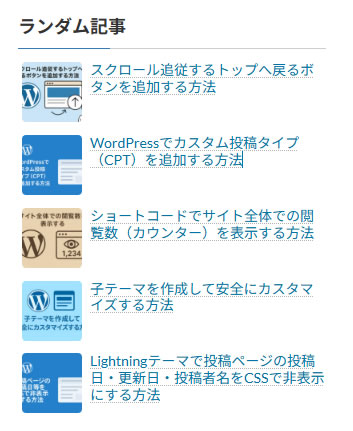
今回は、ランダムで記事リストを表示するサイドバーウィジェットを作る方法を解説します。
投稿ページのサイドバーに置くことで、訪問者に毎回違う記事をアピールできます。
1 実装のポイント
- WordPress の
WP_Widgetを拡張してカスタムウィジェットを作成 orderby => 'rand'でランダム表示- ウィジェットのタイトルや表示件数を設定可能
2 functions.php にコードを追加
//-------------------------------------------
// ランダム関連記事ウィジェット(アイキャッチ付き・回り込み)
//-------------------------------------------
class Random_Related_Posts_Widget extends WP_Widget {

    public function __construct() {
        parent::__construct(
            'random_related_posts', // ウィジェットID
            'ランダム関連記事',     // ウィジェット名
            array('description' => 'サイドバーにアイキャッチ付きのランダム関連記事を表示')
        );
    }

    // ウィジェット表示
    public function widget($args, $instance) {
        echo $args['before_widget'];

        $title = !empty($instance['title']) ? $instance['title'] : '関連記事';
        echo $args['before_title'] . esc_html($title) . $args['after_title'];

        $num_posts = !empty($instance['num_posts']) ? absint($instance['num_posts']) : 5;

        $related = new WP_Query(array(
            'posts_per_page' => $num_posts,
            'post__not_in'   => array(get_the_ID()),
            'orderby'        => 'rand',
        ));

        if ($related->have_posts()) {
            echo '<ul class="sidebar-related-posts">';
            while ($related->have_posts()) {
                $related->the_post();
                echo '<li class="sidebar-related-item">';
                echo '<a href="' . get_permalink() . '">';
                if (has_post_thumbnail()) {
                    echo get_the_post_thumbnail(get_the_ID(), 'thumbnail');
                }
                echo '<span class="sidebar-related-title">' . get_the_title() . '</span>';
                echo '</a></li>';
            }
            echo '</ul>';
        }

        wp_reset_postdata();
        echo $args['after_widget'];
    }

    // ウィジェット設定フォーム
    public function form($instance) {
        $title = isset($instance['title']) ? $instance['title'] : '関連記事';
        $num_posts = isset($instance['num_posts']) ? $instance['num_posts'] : 5;
        ?>
        <p>
            <label>タイトル:</label>
            <input class="widefat" name="<?php echo $this->get_field_name('title'); ?>" type="text" value="<?php echo esc_attr($title); ?>" />
        </p>
        <p>
            <label>表示件数:</label>
            <input class="tiny-text" name="<?php echo $this->get_field_name('num_posts'); ?>" type="number" step="1" min="1" value="<?php echo esc_attr($num_posts); ?>" size="3" />
        </p>
        <?php
    }

    // 更新処理
    public function update($new_instance, $old_instance) {
        $instance = array();
        $instance['title'] = strip_tags($new_instance['title']);
        $instance['num_posts'] = absint($new_instance['num_posts']);
        return $instance;
    }
}

// ウィジェット登録
function register_random_related_posts_widget() {
    register_widget('Random_Related_Posts_Widget');
}
add_action('widgets_init', 'register_random_related_posts_widget');
3 汎用CSS
/* -----------------------------
 * サイドバー関連記事リスト(アイキャッチ付き・回り込み)
 * ----------------------------- */

/* ulタグ自体のリセット */
.sidebar-related-posts {
    list-style: none;       /* デフォルトのリストマーカーを消す */
    padding-left: 0;        /* 左側の余白をリセット */
    margin: 0 0 0 -20px;    /* サイドバーの余白に合わせて調整 */
}

/* 各関連記事アイテム */
.sidebar-related-item {
    margin-bottom: 10px;    /* 各記事の間隔 */
    overflow: hidden;       /* floatで回り込んだ要素を確実に収める */
}

/* サムネイル画像 */
.sidebar-related-item img {
    float: left;            /* 左側に回り込み */
    width: 60px;            /* サムネイル幅 */
    height: 60px;           /* サムネイル高さ */
    object-fit: cover;      /* 枠内に収めつつ切り抜き */
    margin-right: 8px;      /* 画像とタイトルの間隔 */
    border-radius: 4px;     /* 角丸 */
}

/* タイトル */
.sidebar-related-item .sidebar-related-title {
    display: block;         /* ブロック表示で縦に並べる */
    font-size: 14px;        /* 文字サイズ */
    line-height: 1.2;       /* 行間 */
    color: #333;            /* 灰色系リンク色 */
}

/* ホバー時 */
.sidebar-related-item a:hover .sidebar-related-title {
    text-decoration: underline; /* 下線表示 */
    color: #0073aa;             /* 青系リンク色 */
}
4 設置方法
- 上記の PHP コードを子テーマの
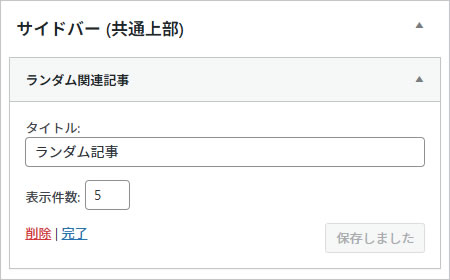
functions.phpに追加 - WordPress 管理画面 → 外観 → ウィジェット → サイドバーに「ランダム関連記事」を追加
- タイトルと表示
5 完成イメージ
5.1 ランダム表示