コードベースで二段階認証(2FA)を導入する方法
 login_user
目次
WordPressのログインセキュリティを高めたい場合、二段階認証(2FA)は必須です。この記事ではプラグインを使わず、PHPと少量のJavaScriptで自前実装する方法を解説します。
1 事前準備
まずはWordPressテーマの functions.php にコードを追加できる状態にしてください。子テーマを利用している場合は functions.php に追加します。
2 function.phpにコードを追加(PHP側で2FAの生成と検証)
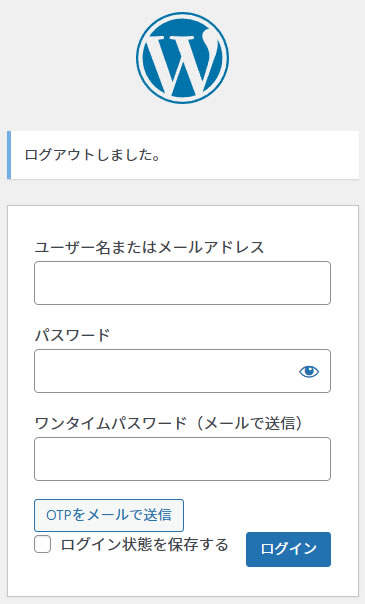
ここでは、ログイン時にワンタイムパスワード(OTP)を生成し、ユーザーのメールに送信して認証させる簡易2FAを例にします。
ユーザー名だけでなく、登録メールアドレスでもOTP送信可能です。Ajax送信時に入力欄にユーザー名またはメールアドレスを入力してください。
//-------------------------------------------
// 安全な二段階認証(2FA) - Ajax対応版(複数ユーザー対応)
//-------------------------------------------

// セッション開始
add_action('init', function() {
    if (!session_id()) session_start();
});

// OTP生成関数
function generate_otp() {
    return random_int(100000, 999999); // より安全なランダム生成
}

// ログインフォームにOTP欄と送信ボタンを追加
add_action('login_form', function() {
    ?>
    <p>
        <label for="otp">ワンタイムパスワード(メールで送信)</label>
        <input type="text" name="otp" id="otp" class="input" value="" size="20">
    </p>
    <p>
        <button type="button" id="send-otp" class="button">OTPをメールで送信</button>
        <span id="otp-message" style="margin-left:10px;"></span>
    </p>

    <script>
    document.addEventListener('DOMContentLoaded', function() {
        var btn = document.getElementById('send-otp');
        btn.addEventListener('click', function() {
            var input = document.getElementById('user_login').value;
            if (!input) {
                alert('ユーザー名またはメールアドレスを入力してください');
                return;
            }

            var data = new FormData();
            data.append('action', 'send_otp');
            data.append('input', input);

            fetch('<?php echo admin_url("admin-ajax.php"); ?>', {
                method: 'POST',
                body: data,
                credentials: 'same-origin'
            })
            .then(res => res.json())
            .then(res => {
                var msg = document.getElementById('otp-message');
                if(res.success){
                    msg.style.color = 'green';
                    msg.textContent = res.data;
                } else {
                    msg.style.color = 'red';
                    msg.textContent = res.data || res.message;
                }
            });
        });
    });
    </script>
    <?php
});

// AjaxでOTP送信(複数ユーザー対応)
add_action('wp_ajax_nopriv_send_otp', 'send_otp_ajax');
function send_otp_ajax() {
    if (!empty($_POST['input'])) {
        $input = sanitize_text_field($_POST['input']);

        // ユーザー名またはメールアドレスで検索
        $user = get_user_by('login', $input);
        if (!$user) {
            $user = get_user_by('email', $input);
        }

        if ($user) {
            $otp = rand(100000, 999999);
            $_SESSION['otp_code'] = $otp;
            wp_mail($user->user_email, 'ワンタイムパスワード', 'あなたのOTPコード: ' . $otp);
            wp_send_json_success('OTPを送信しました。メールを確認してください。');
        } else {
            wp_send_json_error('ユーザーが見つかりません。');
        }
    } else {
        wp_send_json_error('ユーザー名またはメールアドレスを入力してください。');
    }
}

// 認証時にOTPチェック
add_filter('authenticate', function($user, $username, $password) {
    if (is_wp_error($user)) return $user;

    if (!isset($_SESSION['otp_code'])) {
        return new WP_Error('otp_not_sent', '<strong>ERROR</strong>: OTPを送信してください。');
    }

    if (empty($_POST['otp'])) {
        return new WP_Error('otp_empty', '<strong>ERROR</strong>: OTPを入力してください。');
    }

    if ($_POST['otp'] != $_SESSION['otp_code']) {
        return new WP_Error('otp_wrong', '<strong>ERROR</strong>: ワンタイムパスワードが間違っています。');
    }

    unset($_SESSION['otp_code']); // OTP破棄
    return $user;
}, 30, 3);
※注意:本実装では、ログインフォームの「ユーザー名」欄に登録メールアドレスを入力してもOTP送信できます。
3 JavaScriptにコードを追加(送信ボタン設置)
ファイル名:login-2fa.js
保存先:wp-content/themes/child-theme/js/login-2fa.js
//-------------------------------------------
// 安全な二段階認証(2FA) - Ajax対応版(複数ユーザー対応)
//-------------------------------------------
<p>
    <button type="button" id="send-otp" class="button">OTPをメールで送信</button>
    <span id="otp-message"></span>
</p>

<!-- OTP送信ボタン処理 -->
<script>
document.addEventListener('DOMContentLoaded', function() {
    document.getElementById('send-otp').addEventListener('click', function() {
        var username = document.getElementById('user_login').value;
        if (!username) {
            alert('ユーザー名を入力してください');
            return;
        }

        var data = new FormData();
        data.append('action', 'send_otp');
        data.append('username', username);

        fetch(admin_url + 'admin-ajax.php', { // PHPタグは使えないので、enqueue時にwp_localize_scriptで変数渡し
            method: 'POST',
            body: data,
            credentials: 'same-origin'
        })
        .then(res => res.json())
        .then(res => {
            document.getElementById('otp-message').textContent = res.data || res.message;
        });
    });
});
</script>
3.1 ディレクトリ構造
- child-theme/
- archive.php
- category.php
- functions.php
- footer.php
- header.php
- style.css
- js/
- login-2fa.js
4 完成イメージ

5 運用上の注意
- メール送信の遅延によるログイン失敗を防ぐため、SMTP設定を推奨。
- 本例は簡易実装のため、スマホアプリでのTOTPやGoogle Authenticator連携の方がより安全。
- ログインページのカスタマイズにより、セキュリティを高めつつUXも向上可能。
以上で、プラグインなしでWordPressに簡易二段階認証を導入する方法の解説でした。